环境
系统环境: iOS7 – iOS9
(continue reading…)
To Retrieve URL path in STATIC BLOCK
Java代码 收藏代码
To get SKIN URL
{{skin url=’images/sampleimage.jpg ‘}}
To get Media URL
{{media url=’/sampleimage.jpg’}}
To get Store URL
{{store url=’mypage.html’}}
To get Base URL
{{base url=’yourstore/mypage.html’}} (continue reading…)
作为一个开发者的你,肯定要修改 Magento 代码去适应你的业务需求,但是在很多时候我们不希望修改 Magento 的核心代码,这里有很多原因, 例如将来还希望升级 Magento 、还想使用更多的Magento代码。如果你正在寻找修改Magento代码的最佳方式,那么此篇文章将会是一个不错的教程。
(continue reading…)
cHash?
There is a pretty old but nice article from Kasper, that explains the purpose of cHash[1].
To summarize this: If a cHash (or cache Hash) is part of the current URL, and if that cHash is correct, TYPO3 generates a cache entry for the generated content. The cHash is only correct if TYPO3 itself generated the URL.
So with the help of the cHash TYPO3 can cache multiple variants of a page – depending on its request parameters. This is used for example to cache all the detail views of your news records. (continue reading…)
If you have an extbase extension and you need to call a controller action via TypoScript, things have changed from TYPO3 4.7 to 6.1. TYPO3 6 has a lot of code rewritten, depends heavily on PHP namespaces and extbase extensions from earlier versions will no longer work.
To get started with all the necessary bootstrap code for a new extension, use the extension “extension_builder” from TER.
Let’s assume we have a little extension and we want to assign the result of a direct call of a controller action to a TS object.
Our controller code looks like this:
namespace MyVendorName\MyExtName\Controller;
class MyModelController extends \TYPO3\CMS\Extbase\Mvc\Controller\ActionController {
public function myTestAction() {
return “some string”;
}
Please notice the namespace, this is very important! Your ext_localconf.php should look something like this:
…
\TYPO3\CMS\Extbase\Utility\ExtensionUtility::configurePlugin(
‘MyVendorName.’ . $_EXTKEY,
‘Pi1’,
array(
‘MyModel’ => ‘myTest’,
),
// non-cacheable actions
array(
)
);
…
‘Pi1’ is simply the name of the frontend plugin
TypoScript config
Now we set up a TS-object which should hold the output of our “myTestAction” method.
lib.myObj = USER
lib.myObj = 10
10 {
userFunc = TYPO3\CMS\Extbase\Core\Bootstrap->run
pluginName = Pi1
extensionName = MyExtName
controller = MyModel
vendorName = MyVendorName
action = myTest
switchableControllerActions {
MyModel {
1 = myTest
}
}
settings =< plugin.tx_myextname.settings persistence =< plugin.tx_myextname.persistence view =< plugin.tx_myextname.view update =< plugin.tx_myextname.update } The parameter “vendorName” is new and very important – it won’t work without it. Take care of the camel case notation too – the whole extbase framework is based on this case-sensitive coding convention. Now we are done – our controller action is directly called via TypoScript.
//site domain
        $baseURL = '';
        $templateData = $GLOBALS['TYPO3_DB']->exec_SELECTgetSingleRow('*', 'sys_template', 'uid=1');
        $templateService = GeneralUtility::makeInstance(\TYPO3\CMS\Core\TypoScript\ExtendedTemplateService::class);
        $templateService->ext_regObjectPositions($templateData['constants']);
        if(GeneralUtility::_GP('domain')){
            $urlInfo = parse_url(GeneralUtility::_GP('domain'));
            if(!isset($urlInfo['scheme'])){
                $baseURL = 'http://'.$urlInfo['path'].'/';
            }else{
                $baseURL = $urlInfo['scheme'].'://'.$urlInfo['host'].'/';
            }
        }
        $templateService->ext_putValueInConf('config.baseURL', $baseURL);
        // Set the data to be saved
        $recData = array();
        $recData['sys_template'][1]['constants'] = implode($templateService->raw, LF);
        // Create new  tce-object
        $tce = GeneralUtility::makeInstance(\TYPO3\CMS\Core\DataHandling\DataHandler::class);
        $tce->stripslashes_values = FALSE;
        $tce->start($recData, array());
        $tce->process_datamap();
        // Clear the cache (note: currently only admin-users can clear the cache in tce_main.php)
        $tce->clear_cacheCmd('all');
安装地址:https://about.gitlab.com/downloads/
默认是nginx服务器80端口,如果用80 apache,需要改为其它端口(注意8080己被unicorn占用)。
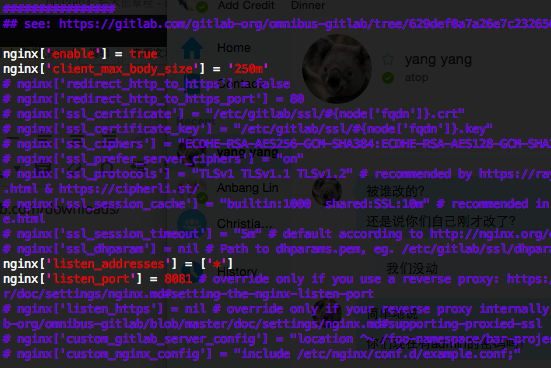
配置apache反向代理
a2enmod proxy proxy_http
#This configuration has been tested on GitLab 6.0.0 and GitLab 6.0.1
#Note this config assumes unicorn is listening on default port 8080.
#Module dependencies
#  mod_rewrite
#  mod_proxy
#  mod_proxy_http

  ServerName yourdomain
  ServerSignature Off

  ProxyPreserveHost On

  # Ensure that encoded slashes are not decoded but left in their encoded state.
  # http://doc.gitlab.com/ce/api/projects.html#get-single-project
  AllowEncodedSlashes NoDecode


    # New authorization commands for apache 2.4 and up
    # http://httpd.apache.org/docs/2.4/upgrading.html#access
    Require all granted

    ProxyPassReverse http://127.0.0.1:8081
    ProxyPassReverse http://yourdomain/


  #apache equivalent of nginx try files
  # http://serverfault.com/questions/290784/what-is-apaches-equivalent-of-nginxs-try-files
  # http://stackoverflow.com/questions/10954516/apache2-proxypass-for-rails-app-gitlab
  RewriteEngine on
  RewriteCond %{DOCUMENT_ROOT}/%{REQUEST_FILENAME} !-f
  RewriteRule .* http://127.0.0.1:8081%{REQUEST_URI} [P,QSA]

  # needed for downloading attachments
  DocumentRoot /opt/gitlab/embedded/service/gitlab-rails/public

  #Set up apache error documents, if back end goes down (i.e. 503 error) then a maintenance/deploy page is thrown up.
  ErrorDocument 404 /404.html
  ErrorDocument 422 /422.html
  ErrorDocument 500 /500.html
  ErrorDocument 503 /deploy.html

  LogFormat "%{X-Forwarded-For}i %l %u %t \"%r\" %>s %b" common_forwarded
  ErrorLog  /var/log/apache2/yourdomain/error.log
  CustomLog /var/log/apache2/yourdomain/forwarded.log common_forwarded
  CustomLog /var/log/apache2/yourdomain/access.log combined env=!dontlog
  CustomLog /var/log/apache2/yourdomain/yourdomain.log combined
参考:https://gitlab.com/gitlab-org/gitlab-recipes/blob/master/web-server/apache/gitlab-apache2.4.conf
重启gitlab: gitlab-ctl reconfigure
重启apache.
使用Gitlab一键安装包安装Gitlab非常简单, 同样的备份恢复与迁移也非常简单. 使用一条命令即可创建完整的Gitlab备份:
gitlab-rake gitlab:backup:create
使用以上命令会在/var/opt/gitlab/backups目录下创建一个名称类似为1393513186_gitlab_backup.tar的压缩包, 这个压缩包就是Gitlab整个的完整部分, 其中开头的1393513186是备份创建的日期.
你也可以通过修改/etc/gitlab/gitlab.rb来修改默认存放备份文件的目录:
gitlab_rails['backup_path'] = '/mnt/backups'
/mnt/backups修改为你想存放备份的目录即可, 修改完成之后使用gitlab-ctl reconfigure命令重载配置文件即可.
也可以通过crontab使用备份命令实现自动备份:
sudo su -
crontab -e
加入以下, 实现每天凌晨2点进行一次自动备份:
0 2 * * * /opt/gitlab/bin/gitlab-rake gitlab:backup:create
同样, Gitlab的从备份恢复也非常简单:
# 停止相关数据连接服务
gitlab-ctl stop unicorn
gitlab-ctl stop sidekiq

# 从1393513186编号备份中恢复
gitlab-rake gitlab:backup:restore BACKUP=1393513186

# 启动Gitlab
sudo gitlab-ctl start
迁移如同备份与恢复的步骤一样, 只需要将老服务器/var/opt/gitlab/backups目录下的备份文件拷贝到新服务器上的/var/opt/gitlab/backups即可(如果你没修改过默认备份目录的话). 但是需要注意的是新服务器上的Gitlab的版本必须与创建备份时的Gitlab版本号相同. 比如新服务器安装的是最新的7.60版本的Gitlab, 那么迁移之前, 最好将老服务器的Gitlab 升级为7.60在进行备份.
最新版本的Gitlab已经修复了HTTPS设备的BUG, 现在使用官方HTTPS配置即可轻松启用HTTPS.
getText ist wohl die mächtigste Funktion, um mal eben von wo auch immer ein paar Daten herzuzaubern. Im Content-Objekt selbst heißt die Funktion getData. Schaut selbst welche Möglichkeiten angeboten werden.
Die Eigenschaft getText besteht aus mehreren Parametern. Der erste Parameter wird mit einem Doppelpunkt von allen anderen Parametern getrennt. Alle weiteren Parameter werden mit Hilfe der | Pipe unterteilt. (continue reading…)
config {
  disableAllHeaderCode = 1
  #additionalHeaders = Content-type:application/json
  xhtml_cleaning = 0
  admPanel = 0
  debug = 0
  no_cache = 1
}
page.includeJS>
page.includeCSS>
page.includeJSFooterlibs>