php

Composer 生产服性能优化指南

Level-1 优化:生成 classmap

生产环境一定要执行该命令,为啥呢?

composer dump-autoload -o(-o 等同于 --optimize

原理:

这个命令的本质是将 PSR-4/PSR-0 的规则转化为 classmap 规则(classmap 中包含了所有类名与类文件路径的对应关系)避免了加载器再去文件系统中遍历查找文件产生不必要的 IO。

当加载器找不到目标类时,仍旧会根据 PSR-4/PSR-0 的规则去文件系统中查找。

Level-2 优化:权威的(Authoritative)classmap

如果想实现加载器找不到类时即停止,那可以采用 Authoritative classmap:

composer dump-autoload -a-a 等同于 --classmap-authoritative

原理:

执行这个命令隐含的也执行了 Level-1 的命令, 即同样也是生成了 classmap,区别在于当加载器在 classmap 中找不到目标类时,不会再去文件系统中查找(即隐含的认为 classmap 中就是所有合法的类,不会有其他的类了,除非法调用)

注意: 如果你的项目在运行时会生成类,使用这个优化策略会找不到这些新生成的类。

Level-1 Plus 优化:使用 APCu Cache

在生产环境下,这个策略一般也会与 Level-1 一起使用, 执行:

composer dump-autoload -o --apcu

APCu 是 APC 去除 opcode 缓存后的精简版,只用于本机数据缓存(共享内存使得数据在多进程间可共享)。

这样,即使生产环境下生成了新的类,只需要文件系统中查找一次即可被缓存 , 弥补了 Level-2/A 的缺陷。

如何选择 & 小结

如果项目在运行时不会生成新的类文件,那么使用 Level-2/A,否则使用 Level-1 及 Level-1 Plus。

Level-2 的优化基本都是 Level-1 优化的补充,Level-2 主要是决定在 classmap 中找不到目标类时是否继续找下去。

Level-1 Plus 主要是在提供了一个缓存机制,将在 classmap 中找不到时,将从文件系统中找到的文件路径缓存起来,加速后续查找的速度。

php-fpm性能

1. 查看是否是硬件问题

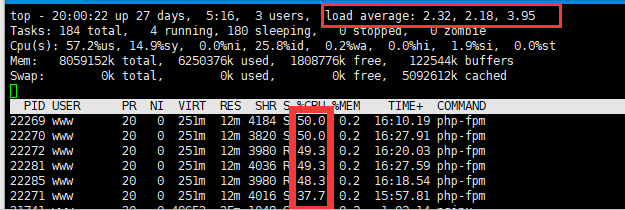
方式:top  命令

主要查看:load average(平均负载),这是一个4核8G内存的服务器

1分钟平均负载:2.32;

5分钟平均负载:2.18;

15分钟平均负载:3.95;

load average  中3个数的含义,如果是1核cpu,那么不能超过1,4核那么就不能超过4,15分钟可以代表长期,5分钟代表中期,1分钟代表短期,所以先看15分钟

大神详解load average

可以说它现在的平均负载接近了它的cpu总核数:4;需要考虑服务器配置升级!


2.查看是否是PHP-fpm的进程数过多

首先使用 free -m 指令查看当前服务器执行状况:

可以看到我的内存消耗不多,也能看到我是2G内存

然后再用  top  命令 m 参数  查看内存情况

再使用:ps auxw|head -1;ps auxw|sort -rn -k4|head -40      查看消耗内存最多的前40个进程

  查看通过命令查看服务器上一共开了多少的 php-cgi 进程:ps -fe |grep "php-fpm"|grep "pool"|wc -l

  查看已经有多少个php-cgi进程用来处理tcp请求:netstat -anp|grep "php-fpm"|grep "tcp"|grep "pool"|wc -l

  设置PHP-FPM的进程数:vi /etc/php-fpm.d/www.conf(根据实际情况变化)找到 pm.max_children 字段,设置一个合理的值,比之前的小

  pm.max_spare_servers : 该值表示保证空闲进程数最大值,如果空闲进程大于此值,此进行清理 pm.min_spare_servers : 保证空闲进程数最小值,如果空闲进程小于此值,则创建新的子进程;

这两个值均不能不能大于 pm.max_children 值,通常设置 pm.max_spare_servers 值为 pm.max_children 值的60%-80%。

正常情况下,一个php–fpm占用内存20~30M

3.进程跟踪

  1.使用  top   找出CPU最高的进程pid

2.strace -p PID(进程数)   来跟踪进程

3. ll /proc/PID/fd   来查看该进程在处理哪些文件

1 Comment more...

MAC上通过brew安装PHP7

升级brew

brew update
配置

(continue reading…)

1 Comment more...

Composer 小技巧

Composer 是新一代的PHP依赖管理工具。其介绍和基本用法可以看这篇《Composer PHP依赖管理的新时代》。本文介绍使用Composer的五个小技巧,希望能给你的PHP开发带来方便。

1. 仅更新单个库
只想更新某个特定的库,不想更新它的所有依赖,很简单:

composer update foo/bar  

此外,这个技巧还可以用来解决“警告信息问题”。你一定见过这样的警告信息:
(continue reading…)


Installing PHP 7 on OS X Yosemite

How to install it?

This tutorial is for OS X users, some procedures might apply for some linux versions too (apache configuration)

1. Get Homebrew

Homebrew is a package manager for OS X. Find install instructions HERE.
(continue reading…)


BOM Header

chr(239).chr(187).chr(191)

Using UTF-8 characters on an e-mail subject

$to = 'example@example.com';
$subject = 'Subject with non ASCII ó¿¡á';
$message = 'Message with non ASCII ó¿¡á';
$headers = 'From: example@example.com'."\r\n"
.'Content-Type: text/plain; charset=utf-8'."\r\n";
mail($to, '=?utf-8?B?'.base64_encode($subject).'?=', $message, $headers);

PHP大文件下载


function loadFile($filename, $retbytes = true) {
        $buffer = '';
        $cnt =0;
        $handle = fopen($filename, 'rb');
        if ($handle === false) {
            return false;
        }
        while (!feof($handle)) {
            $buffer = fread($handle, 1024*1024);
            echo $buffer;
            ob_flush();  // flush output
            flush();
            if ($retbytes) {
                $cnt += strlen($buffer);
            }
        }
        $status = fclose($handle);
        if ($retbytes && $status) {
            return $cnt; // return num. bytes delivered like readfile() does.
        }
        return $status;
    }

php使用curl上传文件post提交

$post_data = array("fax_file"=>'@'.$r_file, "aa"=>'bb'); //文件绝对路径,前面要加@,表明是文件上传.

function uploadByCURL($post_data,$post_url){
    $curl = curl_init();
    curl_setopt($curl, CURLOPT_URL, $post_url);
    curl_setopt($curl, CURLOPT_POST, 1);
    curl_setopt($curl, CURLOPT_POSTFIELDS, $post_data);
    curl_setopt($curl, CURLOPT_RETURNTRANSFER, 1);
    curl_setopt($curl, CURLOPT_HEADER, 0);
    $result = curl_exec($curl);
    curl_close($curl);
    return $result;
}

Unique Code

session_start();

echo $_SESSION['temparray'][] = generateCode();

var_dump($_SESSION['temparray']);

function generateCode(){
    $code = strtoupper(substr(md5(crypt(uniqid(microtime()))), -5));
    if(is_numeric($code)||in_array($code, $_SESSION['temparray'])){
        return generateCode();
    }
    return $code;
}

Copyright © 1996-2010 Add Lives. All rights reserved.
iDream theme by Templates Next | Powered by WordPress
