apache

Postfix 限制发件人 smtpd_sender_restrictions

/etc/postfix/sender_access:
domain1.com OK
domain2.com OK
Run: postmap /etc/postfix/sender_access
/etc/postfix/main.cf
smtpd_sender_restrictions = check_sender_access hash:/etc/postfix/sender_access, reject
/etc/init.d/postfix reload

https://wiki.centos.org/HowTos/postfix_restrictions


gitlab安装

安装地址:https://about.gitlab.com/downloads/

默认是nginx服务器80端口,如果用80 apache,需要改为其它端口(注意8080己被unicorn占用)。
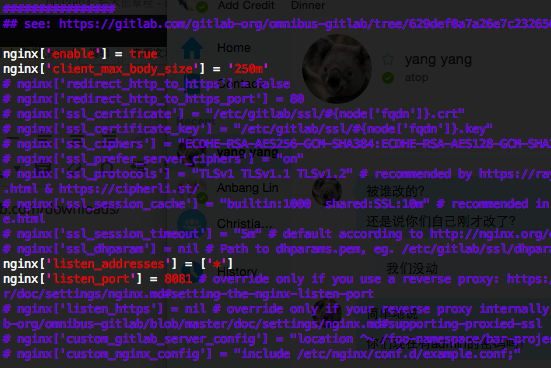


QQ20150902-3


配置apache反向代理
a2enmod proxy proxy_http

#This configuration has been tested on GitLab 6.0.0 and GitLab 6.0.1
#Note this config assumes unicorn is listening on default port 8080.
#Module dependencies
#  mod_rewrite
#  mod_proxy
#  mod_proxy_http

  ServerName yourdomain
  ServerSignature Off

  ProxyPreserveHost On

  # Ensure that encoded slashes are not decoded but left in their encoded state.
  # http://doc.gitlab.com/ce/api/projects.html#get-single-project
  AllowEncodedSlashes NoDecode

  
    # New authorization commands for apache 2.4 and up
    # http://httpd.apache.org/docs/2.4/upgrading.html#access
    Require all granted

    ProxyPassReverse http://127.0.0.1:8081
    ProxyPassReverse http://yourdomain/
  

  #apache equivalent of nginx try files
  # http://serverfault.com/questions/290784/what-is-apaches-equivalent-of-nginxs-try-files
  # http://stackoverflow.com/questions/10954516/apache2-proxypass-for-rails-app-gitlab
  RewriteEngine on
  RewriteCond %{DOCUMENT_ROOT}/%{REQUEST_FILENAME} !-f
  RewriteRule .* http://127.0.0.1:8081%{REQUEST_URI} [P,QSA]

  # needed for downloading attachments
  DocumentRoot /opt/gitlab/embedded/service/gitlab-rails/public

  #Set up apache error documents, if back end goes down (i.e. 503 error) then a maintenance/deploy page is thrown up.
  ErrorDocument 404 /404.html
  ErrorDocument 422 /422.html
  ErrorDocument 500 /500.html
  ErrorDocument 503 /deploy.html

  LogFormat "%{X-Forwarded-For}i %l %u %t \"%r\" %>s %b" common_forwarded
  ErrorLog  /var/log/apache2/yourdomain/error.log
  CustomLog /var/log/apache2/yourdomain/forwarded.log common_forwarded
  CustomLog /var/log/apache2/yourdomain/access.log combined env=!dontlog
  CustomLog /var/log/apache2/yourdomain/yourdomain.log combined


参考:https://gitlab.com/gitlab-org/gitlab-recipes/blob/master/web-server/apache/gitlab-apache2.4.conf

重启gitlab: gitlab-ctl reconfigure

重启apache.


Gitlab 创建备份

使用Gitlab一键安装包安装Gitlab非常简单, 同样的备份恢复与迁移也非常简单. 使用一条命令即可创建完整的Gitlab备份:

gitlab-rake gitlab:backup:create

使用以上命令会在/var/opt/gitlab/backups目录下创建一个名称类似为1393513186_gitlab_backup.tar的压缩包, 这个压缩包就是Gitlab整个的完整部分, 其中开头的1393513186是备份创建的日期.

Gitlab 修改备份文件默认目录

你也可以通过修改/etc/gitlab/gitlab.rb来修改默认存放备份文件的目录:

gitlab_rails['backup_path'] = '/mnt/backups'

/mnt/backups修改为你想存放备份的目录即可, 修改完成之后使用gitlab-ctl reconfigure命令重载配置文件即可.

Gitlab 自动备份

也可以通过crontab使用备份命令实现自动备份:

sudo su -
crontab -e

加入以下, 实现每天凌晨2点进行一次自动备份:

0 2 * * * /opt/gitlab/bin/gitlab-rake gitlab:backup:create

Gitlab 恢复

同样, Gitlab的从备份恢复也非常简单:

# 停止相关数据连接服务
gitlab-ctl stop unicorn
gitlab-ctl stop sidekiq

# 从1393513186编号备份中恢复
gitlab-rake gitlab:backup:restore BACKUP=1393513186

# 启动Gitlab
sudo gitlab-ctl start

Gitlab迁移

迁移如同备份与恢复的步骤一样, 只需要将老服务器/var/opt/gitlab/backups目录下的备份文件拷贝到新服务器上的/var/opt/gitlab/backups即可(如果你没修改过默认备份目录的话). 但是需要注意的是新服务器上的Gitlab的版本必须与创建备份时的Gitlab版本号相同. 比如新服务器安装的是最新的7.60版本的Gitlab, 那么迁移之前, 最好将老服务器的Gitlab 升级为7.60在进行备份.

其他

最新版本的Gitlab已经修复了HTTPS设备的BUG, 现在使用官方HTTPS配置即可轻松启用HTTPS.


Debian系Linux设置开机自启动命令update.rc.d

在Linux系统下,一个Services的启动、停止以及重启通常是通过/etc/init.d目录下的脚本来控制的。然而,在启动或改变运行级别时,是在/etc/rcX.d中来搜索脚本。其中X是运行级别的number。本文将解释如何启动、关闭和修改服务的运行。当你在Debian下安装一个新的服务,比如Apache2,安装完成后,默认情况下它会启动,并在下一次重启后自动启动。但是如果你不是一直需要这个服务,只在需要的时候启用它,你可以禁用它。 (continue reading…)


Sending files better: Apache mod_xsendfile and PHP

I have previously written a quick post on making files downloadable through PHP scripts. The example in the post reads the file itself into a variable, and as pointed out in the comments, it’s not necessarily a very good idea especially if you deal with large files.

Recently at work, we needed a reliable way to send files to users’ browser, and I decided to take a look at mod_xsendfile, as suggested by Tom Graham.

It’s also supported by other web servers such as Lighttpd and nginx. (continue reading…)


常见的 .htaccess 使用技巧

Apache Web 服务器可以通过 .htaccess 文件来操作各种信息,这是一个目录级配置文件的默认名称,允许去中央化的 Web 服务器配置管理。可用来重写服务器的全局配置。该文件的目的就是为了允许单独目录的访问控制配置,例如密码和内容访问。 (continue reading…)

1 Comment more...

转: transfer-encoding:chunked的含义

Transfer-Encoding: chunked 表示输出的内容长度不能确定,普通的静态页面、图片之类的基本上都用不到这个。

但动态页面就有可能会用到,但我也注意到大部分asp,php,asp.net动态页面输出的时候大部分还是使用Content-Length,没有使用Transfer-Encoding: chunked。

不过如果结合:Content-Encoding: gzip 使用的时候,Transfer-Encoding: chunked还是比较有用的。

记得以前实现:Content-Encoding: gzip 输出时,先把整个压缩后的数据写到一个很大的字节数组里(如 ByteArrayOutputStream),然后得到数组大小 -> Content-Length。

如果结合Transfer-Encoding: chunked使用,就不必申请一个很大的字节数组了,可以一块一块的输出,更科学,占用资源更少。

这在http协议中也是个常见的字段,用于http传送过程的分块技术,原因是http服务器响应的报文长度经常是不可预测的,使用Content-length的实体搜捕并不是总是管用。 (continue reading…)


apache下htaccess不起作用,linux,windows详解

可能出现下面这三种的错误可能性: (continue reading…)


Using php 5.4

We have php 5.2 as the default version of php on our shared hosting servers (as many scripts are not compatible with php version 5.4) , if you require php 5.4, or would like to test how your site / scripts runs with the new version of php, simply add the following line to a .htaccess file (in the folder where the scripts files are ) :

AddHandler application/x-httpd-php54 .php

This will then cause all scripts in that folder and folders below to parse using php 5.4

(Please note that ZendGuard and Zend Encoder and IonCube are currently NOT supported on php version 5.4 so if your script is an encoded using Zend Encoder you should use php 5.2 , if the script is encoded using IonCube or ZendGuard, then php version 5.3 can be used ) .


Hosting Multiple SSL Web Sites On One IP Address With Apache 2.2 And GnuTLS (Debian Lenny)

This tutorial describes how you can host multiple SSL-encrypted web sites (HTTPS) on one IP address with Apache 2.2 and GnuTLS on a Debian Lenny server.

For more information on why this couldn’t be done prior to OpenSSL 0.98g or with GnuTLS please refer to http://en.wikipedia.org/wiki/Server_Name_Indication. (continue reading…)


FF SSL 证书错误

TLS v1.0 256 bit AES (1024 bit DHE_RSA/SHA)
TLS v1.0 256 bit AES (2048 bit DHE_RSA/SHA) (FF报错证书因为未提供证书发行链信而不被信任)

(continue reading…)


Copyright © 1996-2010 Add Lives. All rights reserved.
iDream theme by Templates Next | Powered by WordPress