需要把
/node_modules/janalytics-react-native/ios/RCTJAnalyticsModule/janalytics-ios-2.1.2.a
文件名修改为
libjanalytics-ios-2.1.2.a
需要把 /node_modules/janalytics-react-native/ios/RCTJAnalyticsModule/janalytics-ios-2.1.2.a 文件名修改为 libjanalytics-ios-2.1.2.a
There may be a plethora of reasons that you need to check whether or not the device that is using your application has an internet connection.
I have listed two methods here. A quicky use a pre built class method or the do it yourself I like getting dirty with code method. Both ways are valid.
At the bottom there is also another solution posted by a StackOverflow member.
Method 1
You can use a simple (ARC and GCD compatible) class to do it for you.
1) Add SystemConfiguration framework to the project but don’t worry about including it anywhere
2) Add T.Million’s version of Reachability.h and Reachability.m to the project, get these files from the option below:
This content is locked!
Please support us, use one of the buttons below to unlock the content.
tweet
(continue reading…)
以zip打开.ipa文件,添加iTunesArtwork与iTunesMetadata.plist到根目录.
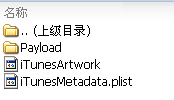
iTunesArtwork: 图标
iTunesMetadata.plist DEMO:
	artistName
	Company Name
	itemName
	App name
	playlistArtistName
	Company Name
	playlistName
	App name
最近项目中,介于测试人员提出的问题,有些情况只在ios6的设备上才能显现,而本机的xcode已升级到最新的5.0,这可如何是好呢,在网上搜索了一番,找到如下方法解决此问题: (continue reading…)
1. Certification(证书)
证书是对电脑开发资格的认证,每个开发者帐号有一套,分为两种:
1) DeveloperCertification(开发证书)
安装在电脑上提供权限:开发人员通过设备进行真机测试。
可以生成副本供多台电脑安装;
2)DistributionCertification(发布证书)
安装在电脑上提供发布iOS程序的权限:开发人员可以制做测试版和发布版的程序。
不可生成副本,仅有配置该证书的电脑才可使用;(副本制做介绍在下面Keychain中介绍) (continue reading…)
企业版IDP,即iOS Development Enterprise Program。注意是$299/Year那种,并不是$99/Year的那种。
这种方式的IDP其最大的好处在于:可以发布“In House”应用。
这种应用使用一种叫做“In House Distribution Provisioning Profile”的文件进行发布,不能发布到Apple Shop进行销售,也不需要经过Apple的评审。你可以把“In House”应用通过任何方式发布给你的企业员工、用户及其他你认可的任何人,尤其适合于企业应用的开发。 (continue reading…)
一、发布测试,是指将你的程序给
实现于控件内部不依附于父视图touch事件
调用方法:
HSCButton *drag = [[HSCButton alloc] initWithFrame:CGRectMake(0, 0, 100, 200)];
drag.backgroundColor = [UIColor blueColor];
drag.dragEnable = YES;
[self.view addSubview:drag];
[drag release];