Author Archive

How to use the Fluid Standalone view to render template based emails

$this->view->setTemplatePathAndFilename(\TYPO3\CMS\Core\Utility\ExtensionManagementUtility::extPath('donate') . 'Resources/Private/Templates/Donors/List_backend.html');

This feature is part of Extbase 1.3, included in TYPO3 4.5 LTS.

Find the Code for TYPO3 version >= 6.0 below

Add the following function to your controller (or preferably to a common abstract base controller).
(continue reading…)


Clear cache in typo3

TYPO3 6.x

first initialize the Service in your Class

/**
 * @var \TYPO3\CMS\Extbase\Service\CacheService
 */
protected $cacheService;

/**
 * @param \TYPO3\CMS\Extbase\Service\CacheService $cacheService
 * @return void
 */
public function injectCacheService(\TYPO3\CMS\Extbase\Service\CacheService $cacheService) {
    $this->cacheService = $cacheService;
}

in your function just call

$this->cacheService->clearPageCache($pids);

while $pids is an integer (for single page) or array of integers (multiple pages)

see: http://typo3.org/api/typo3cms/class_t_y_p_o3_1_1_c_m_s_1_1_extbase_1_1_service_1_1_cache_service.html

In TYPO3 since 4.5 (I think) its a static method so you have just to call

Tx_Extbase_Utility_Cache::clearPageCache($pids);

in your controller.

Found it here: http://www.phpkode.com/source/p/typo-cms/typo3_src+dummy-4.6.5/typo3/sysext/extbase/Classes/MVC/Controller/ActionController.php


Objective-C Soap

https://github.com/iPolaris/SoapRequest
http://www.codeproject.com/Tips/622376/iOS-Soap-Webservice-Calling-and-Parsing-the-Resp

//Import the frameworks header to your ViewController header file :
#import "ASIHTTPRequest.h"
#import "ASIFormDataRequest.h"
#import "SBJson.h" 

//Unfortunately, there is no framework to create a SOAP message for us, so we will create the SOAP message as follows (this is the routine) :
- (IBAction)btnConvert:(id)sender {
   
    NSString *soapMessage = [NSString stringWithFormat:@"\n"
         "\n"
         "\n"
         " \n"
         "%@\n"
         "\n"
         "\n"
         "\n" ,textFieldCelcisus.text];
    
    
    NSURL *url = [NSURL URLWithString:@"http://w3schools.com/webservices/tempconvert.asmx"];
    NSMutableURLRequest *theRequest = [NSMutableURLRequest requestWithURL:url];
    NSString *msgLength = [NSString stringWithFormat:@"%d", [soapMessage length]];
    
    [theRequest addValue: @"text/xml; charset=utf-8" forHTTPHeaderField:@"Content-Type"];
    [theRequest addValue: @"http://tempuri.org/CelsiusToFahrenheit" forHTTPHeaderField:@"SOAPAction"];
    [theRequest addValue: msgLength forHTTPHeaderField:@"Content-Length"];
    [theRequest setHTTPMethod:@"POST"];
    [theRequest setHTTPBody: [soapMessage dataUsingEncoding:NSUTF8StringEncoding]];
    
    NSURLConnection *theConnection = 
      [[NSURLConnection alloc] initWithRequest:theRequest delegate:self];
    
    if( theConnection )
    {
        webData = [NSMutableData data] ;
        NSLog(@"Problem");
    }
    else
    {
        NSLog(@"theConnection is NULL");
    }
       
    
}// end of buton convert


//After making our request to the server, we need to catch the server response, for this. By using the connectionDidFinishLoading method, we catch the service response.
-(void)connection:(NSURLConnection *)connection didReceiveResponse:(NSURLResponse *)response
{
    [webData setLength: 0];
}
-(void)connection:(NSURLConnection *)connection didReceiveData:(NSData *)data
{
    [webData appendData:data];
}
-(void)connection:(NSURLConnection *)connection didFailWithError:(NSError *)error
{
    NSLog(@"ERROR with theConenction");
   
}
-(void)connectionDidFinishLoading:(NSURLConnection *)connection
{
    NSLog(@"DONE. Received Bytes: %d", [webData length]);
    NSString *theXML = [[NSString alloc] initWithBytes: 
      [webData mutableBytes] length:[webData length] encoding:NSUTF8StringEncoding];
}


//Now we got the data in XML form, but we need to parse this XML to get our fahrenheit value. To do that, we need to add NSXMLParser's delegate to our viewController:
@interface SEViewController : UIViewController  

//In connectionDidFinishLoading method, we create an NSXMLParser object and pass the server response to it:
-(void)connectionDidFinishLoading:(NSURLConnection *)connection
{
    NSLog(@"DONE. Received Bytes: %d", [webData length]);
    NSString *theXML = [[NSString alloc] initWithBytes: 
      [webData mutableBytes] length:[webData length] encoding:NSUTF8StringEncoding];
   
    NSData *myData = [theXML dataUsingEncoding:NSUTF8StringEncoding];
   
    NSXMLParser *xmlParser = [[NSXMLParser alloc] initWithData:myData];
   
    // Don't forget to set the delegate!
    xmlParser.delegate = self;
   
    // Run the parser
    BOOL parsingResult = [xmlParser parse];
   
}

//Finally, we will implement NSXMLParser's delegate methods to get each element:


-(void) parser:(NSXMLParser *)parser didStartElement:(NSString *)elementName 
  namespaceURI:(NSString *)namespaceURI qualifiedName:
    (NSString *)qName attributes:(NSDictionary *)attributeDict
{
    NSString  *currentDescription = [NSString alloc];
}
- (void)parser:(NSXMLParser *)parser foundCharacters:(NSString *)string
{
    curDescription = string;
}
- (void)parser:(NSXMLParser *)parser didEndElement:(NSString *)elementName 
  namespaceURI:(NSString *)namespaceURI qualifiedName:(NSString *)qName
{
    if([elementName isEqual: @"CelsiusToFahrenheitResult"]);
    textFieldResult.text = curDescription;
} 

TS查表

ts_bcn.20 = CONTENT
ts_bcn.20{
    table = tx_extpackage_data
    select.pidInList = 0
    select.uidInList.data = GP:uid
    renderObj = COA_INT
    renderObj {
       10 = TEXT
       10.field = package_id
       20 = TEXT
       20.field = consignee_lastname
       20.wrap = , |
       30 = TEXT
       30.field = consignee_firstname
    }
    wrap = 

|

}
lib.randomArticles = CONTENT
lib.randomArticles {
	wrap = 
|
table = tx_articledatabase_articles select { pidInList = 97 orderBy = rand() max = 3 } renderObj > renderObj = COA_INT renderObj { 10 = TEXT 10.field = title 10.wrap =

|

20 = TEXT 20.field = description 20.wrap=

|

20.typolink.parameter = 97 20.typolink.additionalParams.field=uid 20.typolink.additionalParams.wrap = &tx_articledatabase_pi1[showUid]=| 20.crop = 150|...|1 } }
10 = CONTENT
10 {
    table = pages
    select.pidInList = 5
    renderObj = COA
    renderObj {
        10 = TEXT
        10.field = title
        20 = TEXT
        20.data = COBJ:parentRecordNumber
    }
}

Android: How to check if the server is available?

InetAddress.getByName(host).isReachable(timeOut)

Check if Active Internet Connection Exists on iOS Device

There may be a plethora of reasons that you need to check whether or not the device that is using your application has an internet connection.
I have listed two methods here. A quicky use a pre built class method or the do it yourself I like getting dirty with code method. Both ways are valid.

At the bottom there is also another solution posted by a StackOverflow member.

Method 1
You can use a simple (ARC and GCD compatible) class to do it for you.

1) Add SystemConfiguration framework to the project but don’t worry about including it anywhere

2) Add T.Million’s version of Reachability.h and Reachability.m to the project, get these files from the option below:

This content is locked!
Please support us, use one of the buttons below to unlock the content.
tweet
(continue reading…)


Webview redirect to Native App

PhoneGap

if you put this logic in on your "site" along wiht the cordova include, you will be able to redirect back to native html pages from a site html page.  You will have your base path for the redirect, then you just need to know the exact file name that you are trying to redirect to.
  function onDeviceReadyIOS() {
            window.requestFileSystem(LocalFileSystem.PERSISTENT, 0, onFS, null);
        }
        function onFS(fs) {
            iOSFilePath = fs.root.toURL();
                pathForNativeRedirect = iOSFilePath.replace("/Documents", "").replace("localhost", "").replace(/ /g, '%20') + '/[your app name].app/www/';
        }
        function onDeviceReadyAndroid() {
            pathForNativeRedirect = 'file:///android_asset/www/';
        }

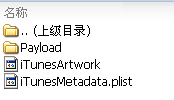
ipa图标,说明

以zip打开.ipa文件,添加iTunesArtwork与iTunesMetadata.plist到根目录.

QQ20140916-6

iTunesArtwork: 图标

iTunesMetadata.plist DEMO:


	artistName
	Company Name
	itemName
	App name
	playlistArtistName
	Company Name
	playlistName
	App name


linux 下查看局域网内所有存活主机和MAC进址

用namp对局域网扫描一遍,然后查看arp缓存表就可以知道局域内ip-mac的对应了
namp比较强大也可以直接扫描mac地址和端口

进行ping扫描,打印出对扫描做出响应的主机:   
nmap -sP 192.168.1.0/24   
仅列出指定网络上的每台主机,不发送任何报文到目标主机:   
nmap -sL 192.168.1.0/24   
探测目标主机开放的端口,可以指定一个以逗号分隔的端口列表(如-PS22,23,25,80):   
nmap -PS 192.168.1.234   
使用UDP ping探测主机:   
nmap -PU 192.168.1.0/24   
使用频率最高的扫描选项:SYN扫描,又称为半开放扫描,它不打开一个完全的TCP连接,执行得很快:   
nmap -sS 192.168.1.0/24

执行扫描之后就可以 cat /proc/net/arp查看arp缓存表了

1 Comment more...

PHP大文件下载


function loadFile($filename, $retbytes = true) {
        $buffer = '';
        $cnt =0;
        $handle = fopen($filename, 'rb');
        if ($handle === false) {
            return false;
        }
        while (!feof($handle)) {
            $buffer = fread($handle, 1024*1024);
            echo $buffer;
            ob_flush();  // flush output
            flush();
            if ($retbytes) {
                $cnt += strlen($buffer);
            }
        }
        $status = fclose($handle);
        if ($retbytes && $status) {
            return $cnt; // return num. bytes delivered like readfile() does.
        }
        return $status;
    }

Copyright © 1996-2010 Add Lives. All rights reserved.
iDream theme by Templates Next | Powered by WordPress