php-fpm性能

1. 查看是否是硬件问题

方式:top  命令

主要查看:load average(平均负载),这是一个4核8G内存的服务器
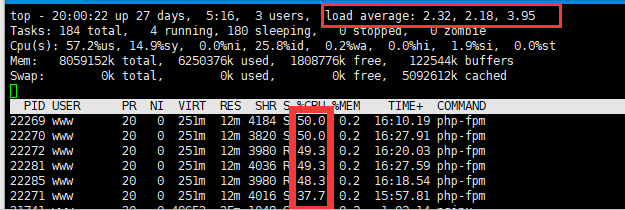
1分钟平均负载:2.32;

5分钟平均负载:2.18;

15分钟平均负载:3.95;

load average  中3个数的含义,如果是1核cpu,那么不能超过1,4核那么就不能超过4,15分钟可以代表长期,5分钟代表中期,1分钟代表短期,所以先看15分钟

大神详解load average

可以说它现在的平均负载接近了它的cpu总核数:4;需要考虑服务器配置升级!


2.查看是否是PHP-fpm的进程数过多

首先使用 free -m 指令查看当前服务器执行状况:

可以看到我的内存消耗不多,也能看到我是2G内存

然后再用  top  命令 m 参数  查看内存情况

再使用:ps auxw|head -1;ps auxw|sort -rn -k4|head -40      查看消耗内存最多的前40个进程

  查看通过命令查看服务器上一共开了多少的 php-cgi 进程:ps -fe |grep "php-fpm"|grep "pool"|wc -l

  查看已经有多少个php-cgi进程用来处理tcp请求:netstat -anp|grep "php-fpm"|grep "tcp"|grep "pool"|wc -l

  设置PHP-FPM的进程数:vi /etc/php-fpm.d/www.conf(根据实际情况变化)找到 pm.max_children 字段,设置一个合理的值,比之前的小

  pm.max_spare_servers : 该值表示保证空闲进程数最大值,如果空闲进程大于此值,此进行清理 pm.min_spare_servers : 保证空闲进程数最小值,如果空闲进程小于此值,则创建新的子进程;

这两个值均不能不能大于 pm.max_children 值,通常设置 pm.max_spare_servers 值为 pm.max_children 值的60%-80%。

正常情况下,一个php–fpm占用内存20~30M

3.进程跟踪

  1.使用  top   找出CPU最高的进程pid

2.strace -p PID(进程数)   来跟踪进程

3. ll /proc/PID/fd   来查看该进程在处理哪些文件

1 Comment more...

ssl证书到期时间查询

  1. 在服务端使用 Openssl 工具进行查看

    由于我服务端是搭建在 Centos 上,所以用 xshell 或者 putty 工具登录后,进入证书目录,使用 openssl 命令进行查看:

    # cd /usr/ssl/cert

    # openssl x509 -in signed.crt -noout -dates

    上面改成你自己证书的所在目录,证书名称也改成你自己服务端上证书的名称。

  2. 使用 php 代码方法进行查看

    如果你有多个可访问的域名,那么使用代码的方法进行查看就会容易很多,省得一个一个手动查看。下面贴上代码:

    /**
     * 获取证书有效期
     */
    public function getValidity(){
      $domain = "sslforfree.com";
      $context = stream_context_create(array("ssl" => array("capture_peer_cert_chain" => true)));
      $socket = stream_socket_client("ssl://$domain:443", $errno, $errstr, 30, STREAM_CLIENT_CONNECT, $context);
      $context = stream_context_get_params($socket);
      foreach ($context["options"]["ssl"]["peer_certificate_chain"] as $value) {
        //使用openssl扩展解析证书,这里使用x509证书验证函数
        $cerInfo = openssl_x509_parse($value);
        if(strpos($cerInfo['name'],$domain)) {
          echo  "start:".date("Y-m-d",$cerInfo['validFrom_time_t'])."<br/>";
          echo "end:".date("Y-m-d",$cerInfo['validTo_time_t']);
        }
      }
    }


git还原代码

如果你的仓库是自己在用(不影响别人),那么你可以使用

git reset --hard <target_commit_id>


来恢复到指定的提交,再用

git push -f


来强制更新远程的分支指针。为了保证万一需要找回历史提交,我们可以先打一个 tag 来备份。


如果你的仓库是多人在协作,那么你这么操作会使用别人本地的代码库混乱,所以只能建一个新的提交,这个新的提交中把想取消的提交都 revert 掉,那么具体应该如何做呢?方法如下:

首先,和刚刚一样,用

git reset --hard 23801b2

将代码切换到目标提交的 id。接下来,用

git reset --soft origin/source 命令(source 分支)

,将当前代码切换回最新的提交。

执行完上面两步后,你的仓库还是最新的提交,但是工作区变成了历史的提交内容,这个时候用 git add 和 git commit 即可。

该方法需要保证 reset 的时候没有别人做新的提交,如果有的话,会一并把别人的提交也撤销了。所以还是挺危险的,慎用。


Magento deploy

1. php bin/magento deploy:mode:set production
2. rm -rf var/di/* && rm -rf var/generation/* && rm -rf var/cache/* && rm -rf var/page_cache/* && rm -rf var/view_preprocessed/* && rm -rf pub/static/* && rm -rf generated/* && php bin/magento setup:upgrade && php bin/magento setup:di:compile
3. php bin/magento setup:static-content:deploy fi_FI en_US sv_SE -f && php bin/magento indexer:reindex && php bin/magento maintenance:disable && php bin/magento cache:clean && php bin/magento cache:flush


Composer Memory No Limit

$ COMPOSER_MEMORY_LIMIT=-1 php composer.phar [command]

1 Comment more...

Iframe适应高度

<script type="text/javascript"> 
        function reinitIframe() {
          var iframe = document.getElementById("form-iframe");
          try {
            var bHeight = iframe.contentWindow.document.body.scrollHeight;
            var dHeight = 900;
            var height = Math.max(bHeight, dHeight);
            iframe.height = height;
          } catch (ex) {}
        }
        window.setInterval("reinitIframe()", 200);
</script>


overwrite render list

You have to override two core checkout xml file for override default.phtml file in magento 2,

app/code/XYZ/Checkout/view/frontend/layout/checkout_cart_index.xml

<?xml version="1.0"?>
<page xmlns:xsi="http://www.w3.org/2001/XMLSchema-instance" layout="1column" xsi:noNamespaceSchemaLocation="urn:magento:framework:View/Layout/etc/page_configuration.xsd">
    <body>
        <referenceBlock class="Magento\Checkout\Block\Cart" name="checkout.cart.form">
            <block class="Magento\Framework\View\Element\RendererList" name="checkout.cart.item.renderers.override" as="renderer.list.custom"/>
            <arguments>
                <argument name="renderer_list_name" xsi:type="string">checkout.cart.item.renderers.override</argument>
            </arguments>
        </referenceBlock>
    </body>
</page>

app/code/XYZ/Checkout/view/frontend/layout/checkout_cart_item_renderers.xml

<?xml version="1.0"?>
<page xmlns:xsi="http://www.w3.org/2001/XMLSchema-instance" xsi:noNamespaceSchemaLocation="urn:magento:framework:View/Layout/etc/page_configuration.xsd">
    <body>
        <referenceBlock name="checkout.cart.item.renderers.override">

            <block class="Magento\Checkout\Block\Cart\Item\Renderer" as="default" template="XYZ_Checkout::cart/item/default.phtml" />              

            <block class="Magento\Checkout\Block\Cart\Item\Renderer" as="simple" template="XYZ_Checkout::cart/item/default.phtml" />   

        </referenceBlock>
    </body>
</page>


magento翻译

1. In .ptml files

  • Use the function  __()

__(‘<your_string>’)

  • For example:
  • If your string contains a variable,you can use::
  • In this example, the ‘Hello %s’ string is added to the dictionary when the i18n tool is run.

2. In email template

If your theme contains custom email template, use the {{trans}} directive.

3. Strings added in UI components’ templates

  • A string is added in the scope of an HTML element:
  • A string is added with no binding to an HTML element:

4.Strings added in UI components configuration files

  • Use the translate attribute in .xml files:

5.Strings added in .js files

  • Define
  • Use the $.mage.__(”) function when adding a string:
  • If your string contains a variable:

The  5 steps I mention above is the shortest process for you to Translate a String by Code in Magento 2. With this guide, you can manage the String by Code in Magento 2 easily. Every store has a String by Code in Magento 2 with many attributes.


Percona Xtrabackup快速备份MySQL

1.1 了解备份方式

  • 热备份:读写不受影响(mysqldump–>innodb)
  • 温备份:仅可以执行读操作(mysqldump–>myisam)
  • 冷备份:离线备份,读写都不可用
  • 逻辑备份:将数据导出文本文件中(mysqldump)
  • 物理备份:将数据文件拷贝(xtrabackup、mysqlhotcopy)
  • 完整备份:备份所有数据
  • 增量备份:仅备份上次完整备份或增量备份以来变化的数据
  • 差异备份:仅备份上次完整备份以来变化的数据

(continue reading…)


SVG去白边

<!DOCTYPE html>
<html lang="en">
<head>
    <meta charset="UTF-8">
    <title>Test JS</title>
    <style>
        #original, #target {
            width: 480px;
            height: 480px;
        }

        svg {
            width: 100%;
            height: 100%;
        }
    </style>
</head>
<body>

<div id="original">
    <svg xmlns="http://www.w3.org/2000/svg" xmlns:xlink="http://www.w3.org/1999/xlink" version="1.1" width="100px" height="100px" viewBox="0 0 480 480" xml:space="preserve">
        <desc>Created with Fabric.js 1.5.0</desc>
        <defs></defs>
        <rect x="-240" y="-240" rx="0" ry="0" width="480" height="480" style="stroke: none; stroke-width: 1; stroke-dasharray: ; stroke-linecap: butt; stroke-linejoin: miter; stroke-miterlimit: 10; fill: #ffffff; fill-rule: nonzero; opacity: 1;" transform="translate(240 240)"/>
<g transform="translate(240 240)">
<image xlink:href="http://shirtcity.local/pub/media/pdp/images/file1534511892.png" x="-240" y="-240" style="stroke: none; stroke-width: 1; stroke-dasharray: ; stroke-linecap: butt; stroke-linejoin: miter; stroke-miterlimit: 10; fill: rgb(0,0,0); fill-rule: nonzero; opacity: 1;" width="480" height="480" preserveAspectRatio="xMinYMin slice"></image>
</g>
<g style="stroke: none; stroke-width: 1; stroke-dasharray: ; stroke-linecap: butt; stroke-linejoin: miter; stroke-miterlimit: 10; fill: none; fill-rule: nonzero; opacity: 1;" transform="translate(213.64 115.51000000000002) scale(0.08 0.08)" >
<path d="M 29.9 118 c 11.6 10.1 23.6 19.8 35.1 30.1 c 6.6 5.9 15.1 10.3 21.6 16.4 c -14.5 8.9 -27.2 24.3 -35 35.5 c -1.1 1.5 -1.1 3.2 -0.5 4.6 c 9.1 -18.7 23.4 -29.7 40.3 -34.8 c 3.7 5.7 0 10.4 -1.5 16.6 c -4.2 17.4 -13.5 32.8 -22 48.4 c -6.4 11.7 -14 22.6 -19.5 34.6 c 0.8 4.5 2.7 8.2 5 11.6 c 3 4.3 6.3 8.4 8.8 13.1 c 2.1 3.9 5.8 6.4 10.1 6.2 c 5.1 -0.3 9.9 0.6 14.6 2.1 c 0.7 0.2 1.6 -0.1 2.6 -0.2 c 4.9 -2.7 7.2 -7.5 9.1 -12.4 c 6.9 -17.6 19.8 -29.1 36.7 -36.4 c 13.5 -5.8 27.8 -9.5 41.2 -15.9 c 3.1 2.1 3.8 5.4 5 8.5 c 7.9 20.5 12.8 41.8 17.7 63.2 c 2.1 8.9 4 17.9 8.2 26.1 c 6.3 12.4 7.6 25.9 8.8 39.4 c 1.7 19 3.1 38.1 6.1 57 c 2.2 13.7 7.8 25.4 17.8 34.8 c 5.5 5.2 8.3 11.3 10 18.6 c 5.4 22.4 12.4 44.3 19.8 66.1 c 3.1 9.3 4.7 18.8 5.9 28.4 c 1.5 12.4 3.9 24.6 7.9 36.5 c 5.1 15.1 7.8 30.7 8.3 46.5 c 0.3 10.5 -1 21 -3.7 31.3 c -2.4 9 -7.5 16 -15 21.3 c -6.1 4.4 -12.2 8.7 -17.3 14.2 c -2.7 2.9 -2.7 2.9 -3.2 8 c 8.1 6.4 29.2 7.3 39.1 1.2 c 0.8 -3.8 1.5 -8.1 2.6 -12.4 c 1.4 -5.7 2.8 -11.5 8.7 -13.9 c 2.1 -4.2 2.5 -8.3 2.7 -12.4 c 1.1 -23 2.2 -46 3.6 -68.9 c 0.4 -7.1 1.4 -14.3 2.2 -21.2 c 2.9 -0.7 3.2 1.4 3.7 2.7 c 4.9 11.9 8.6 24.1 9.1 36.9 c 0.4 12.2 0.1 24.4 0 36.6 c -0.1 9.5 -3.5 17.9 -9.7 25.1 c -5.4 6.2 -11 12.4 -17 19.1 c 12.6 6.5 25.3 5.8 38.1 4.4 c 1.9 -4.4 2.9 -8.1 3.1 -11.9 c 0.3 -7.6 2.7 -14.1 9.1 -18 c 1.9 -3.3 1.5 -6.5 1.3 -9.5 c -0.5 -8.3 -1 -16.6 -2 -24.8 c -2.1 -16.8 -3.8 -33.6 -5.1 -50.4 c -1.3 -16.6 -2.2 -33.2 -3.5 -49.8 c -1.8 -22.7 -1.3 -45.5 -1.1 -68.2 c 0.1 -5.8 0.8 -11.5 2.3 -17.5 c 5 -0.7 9.9 -1.8 14.8 -2 c 12.7 -0.5 25.5 -1 38.2 -1.5 c 22.1 -1 44.3 -1.9 66.4 -3.8 c 20.6 -1.7 40.5 -6 59.7 -13.6 c 12.4 -4.9 24 -11.5 35.8 -17.6 c 6.9 -3.6 14 -6.6 22.1 -8 c 6.6 3 11.6 8 15.1 14.5 c 9.9 18 17.3 37.2 23.7 56.7 c 6.4 19.5 10.5 39.6 13.7 59.9 c 1.8 11.5 3.3 23.1 3.9 34.7 c 0.9 14.9 -2.2 29.2 -7.7 43.1 c -4.4 11.1 -8.9 22.1 -13.2 33.3 c -2.1 5.5 -6 9.3 -10.4 12.7 c -7.1 5.5 -12.5 12.5 -18.3 19.3 c -1.4 1.7 -2.6 3.6 -3 6.1 c 1.6 4.5 5.1 7 10 7.1 c 7.7 0.1 15.6 0.5 23 -2.6 c 4.7 -4.3 6.2 -10.4 8.2 -16.1 c 2.3 -6.8 5.2 -12.6 12.2 -15.9 c 4.4 -2.1 6.8 -6.2 8 -11.1 c 3.2 -13.2 5 -26.7 6.8 -40.1 c 1.7 -12.1 3.3 -24.2 5 -36.2 c 1.2 -8.1 5 -15.2 8.4 -22.5 c 2.6 -5.5 5.4 -11 8 -16.5 c 3.3 -7 4.4 -14.1 2.3 -21.8 c -1.9 -6.7 -3.1 -13.5 -4.7 -20.2 c -0.4 -1.6 -0.9 -3.3 0.7 -4.6 c 2.6 -1 4.1 1.1 5.8 2.4 c 12.7 10.1 22.9 22.5 32.2 35.8 c 13 18.6 22.8 38.7 28 60.9 c 1.5 6.5 2.6 13 2.6 19.8 c 0 15.5 0 31.1 0.3 46.6 c 0.1 6.7 -2.6 11.5 -7.9 15.6 c -9.6 7.4 -16.5 17.1 -22.5 27.5 c -1.4 2.4 -2.8 4.8 -2.7 7.6 c 1.1 3.9 4.6 4 7.4 4.6 c 6.3 1.3 12.7 1.5 19.1 0.2 c 7.4 -1.4 13.2 -5.6 17.5 -11.8 c 2 -2.9 2.4 -6.1 2.3 -9.5 c -0.1 -3.8 -1.2 -7.7 0.7 -11.3 c 2.3 -2.7 5.6 -2.7 8.3 -4 c 7.1 -3.1 7.8 -4.5 6.8 -12 c -1.8 -12.9 -5.5 -25.4 -8.1 -38.2 c -0.6 -3 -1 -6 -1.1 -9 c -0.6 -25.8 -1.2 -51.6 -2 -77.4 c -0.1 -5 -0.9 -9.9 -1.4 -14.9 c -0.3 -2.9 -1.8 -5.2 -3.6 -7.4 c -4.3 -5.5 -8.5 -11 -13 -16.2 c -9.4 -11 -15.5 -23.6 -18.9 -37.5 c -1.5 -6.3 -1.3 -12.7 -0.1 -19 c 3.1 -15.8 8.6 -30.9 13.4 -46.3 c 3.7 -11.9 7.8 -23.7 9.6 -36.1 c 2.1 -14.8 3.7 -29.7 1 -44.7 c -0.9 -5 -2.7 -9.6 -4.9 -14.1 c -3.3 -6.4 -6.6 -12.8 -10 -19.2 c -2 -3.6 -3 -7.1 0.5 -10.7 c 4.1 0.8 6.3 3.6 7.9 6.8 c 7.2 14.7 13.9 29.5 15.3 46.3 c 0.7 8.9 1.1 17.7 1.3 26.6 c 0.7 34.9 1.3 69.9 2 104.9 c 0.2 11.1 0.9 22.2 1.5 33.2 c 0.1 2.2 0.6 4.4 1.1 6.5 c 5.7 23.1 11.5 46.2 17.1 69.4 c 1.5 6.2 4.3 11.3 10.8 13.9 c 2.3 -5.7 -2.5 -11.4 0 -17.2 c 0.9 4.3 2.4 8.2 2.2 12.4 c -0.2 4 0.8 7.6 3 10.7 c 1.9 1.4 3.7 1.7 6 0.5 c 5.4 -8.7 1.6 -19 3.8 -29.3 c 4.1 6.1 2.9 13.1 6.3 19.2 c 1.7 -4.4 2.3 -8.5 2.4 -12.6 c 0.1 -4.7 0.2 -9.4 0.2 -14.1 c 0 -4.3 0 -8.6 0.6 -13 c 1.2 6 0.8 12.1 3.7 17.9 c 3.6 -4 4.3 -9.1 5.1 -13.9 c 1 -5.5 1.6 -11 1.8 -16.5 c 1.5 -42.4 2.3 -84.9 1.6 -127.3 c -0.2 -11.9 -0.4 -23.9 -1.5 -35.8 c -1.9 -21.3 -5 -42.4 -12.4 -62.6 c -9.9 -27.2 -29.5 -42.8 -57.8 -47.8 c -9.6 -1.7 -19.2 -2.6 -28.9 -3.1 c -13 -0.6 -25.8 -2.5 -38.4 -6.2 c -27.5 -8 -55.8 -8.9 -84.1 -7 c -18.8 1.3 -37 6.4 -55.3 11 c -18 4.5 -36.2 8.2 -54.7 10.1 c -9.6 1 -19.4 0.8 -29.1 0.8 c -15.5 0 -31.1 -0.3 -46.5 -2.3 c -17.5 -2.3 -34.6 -6.1 -50.9 -12.6 c 5.3 -2.5 10.4 -5.7 15.2 -9.5 c 2.8 -2.2 1.3 -7.5 -2.1 -8.1 c -9.5 -1.7 -14 -10.4 -19.3 -17.5 c -0.7 -0.9 -1.4 -1.8 -2 -2.6 c 6.9 -2.1 13.6 -5 19.6 -9 c 3.9 -2.6 2.6 -9.1 -2.5 -9.1 h -38.6 c -1.3 -4.4 -1.3 -9 -2.4 -13.9 c -1.6 -7.3 -6.3 -13.7 -12.7 -17.5 c -10.2 -6 -24.4 -4.5 -34.3 -10.7 c 0.7 -0.4 1.2 -1 1.6 -1.7 c 16.9 -1 33.1 2.9 46.8 13.5 c 0.7 0.1 1.4 0.2 2.1 0.3 c -14.9 -12.6 -35.4 -25.6 -53.3 -22.5 c 0.1 -0.2 0.1 -0.3 0.2 -0.5 c 8.6 -1.8 16.4 -5.6 21.8 -14.2 c 2.1 -3.3 -0.7 -7.1 -4.2 -7.3 c -17.4 -1.3 -35 -0.4 -52.4 -2 c -4.4 -1.8 -8.9 -3.2 -13.7 -3.9 c -7.3 -1.1 -14.5 -1.2 -21.8 -1.1 c 1.4 -0.9 2.7 -1.9 4.1 -2.9 c 4.3 -3.1 1.9 -10.6 -3.8 -8.9 c -18.6 5.6 -37.9 7.1 -57.2 8.6 c -0.9 0.1 -1.7 0.4 -2.4 0.8 c -7.4 -5.9 -13.1 -14.2 -22.3 -19.3 c -1.1 7 2.9 12.8 2.4 19.2 c -4.8 -1.9 -5.6 -2.6 -9.9 -8.9 c -2.5 -3.6 -4.9 -7.2 -7.5 -11.2 c -2.9 6.8 -2.9 6.8 5.6 33.7 c -1 4 -4.1 6.6 -7.1 8.9 c -1 0.7 -1.9 1.5 -2.8 2.3 c -24.1 -11.9 -45.2 -29.7 -69.2 -40.9 c -1.1 -0.5 -2.1 -0.6 -3.1 -0.4 c -0.1 -0.1 -0.2 -0.2 -0.3 -0.3 C 32.1 107 25.2 113.9 29.9 118 z M 361.1 221.8 h 2.8 c -0.7 0.2 -1.4 0.4 -2.1 0.5 C 361.6 222.2 361.3 222 361.1 221.8 z" style="stroke: none; stroke-width: 1; stroke-dasharray: ; stroke-linecap: butt; stroke-linejoin: miter; stroke-miterlimit: 10; fill: rgb(0,0,0); fill-rule: nonzero; opacity: 1;" transform="" stroke-linecap="round" />
</g>
<g transform="translate(254.97 215.46)">
<text font-family="Arial" font-size="25" font-weight="normal" style="stroke: none; stroke-width: 1; stroke-dasharray: ; stroke-linecap: butt; stroke-linejoin: miter; stroke-miterlimit: 10; fill: #000; fill-rule: nonzero; opacity: 1;" ><tspan x="-31" y="3.6375" fill="#000">TEST</tspan></text>
</g>
<g transform="translate(240 240)">
<image xlink:href="http://shirtcity.local/pub/media/pdp/images/file1534511892mask.png" x="-240" y="-240" style="stroke: none; stroke-width: 1; stroke-dasharray: ; stroke-linecap: butt; stroke-linejoin: miter; stroke-miterlimit: 10; fill: rgb(0,0,0); fill-rule: nonzero; opacity: 1;" width="480" height="480" preserveAspectRatio="none"></image>
</g>
</svg>
</div>

<div id="target"></div>

<script type="text/javascript">
    fitSVGPreview(document.getElementById('original').innerHTML);
    function fitSVGPreview(svg) {
        svg = svg.replace(/\<g transform\=\"translate\(240\ 240\)\"\>[\s\S]*?<\/g\>/g, '');
        svg = svg.replace(/\<rect\ x\="\-240"([^>]*?)>/g, '');
        document.getElementById('target').innerHTML = svg;
        var tempSVG = document.getElementById('target').children[0];
        var box = tempSVG.getBBox();
        tempSVG.setAttribute("viewBox", [box.x, box.y, box.width, box.height].join(" "));
    }
</script>

</body>
</html>


Copyright © 1996-2010 Add Lives. All rights reserved.
iDream theme by Templates Next | Powered by WordPress