temp.elemente = COA
temp.elemente {
10 = CONTENT
10 {
table = tt_content
select {
where = colPos = 2
orderBy = sorting
}
renderObj < tt_content
renderObj.wrap = |###SPLITTER###
}
stdWrap.split {
token = ###SPLITTER###
cObjNum = 1 |*| 2 || 3 |*| 4 || 5
1.current = 1
1.wrap = |
2.current = 1
2.wrap = |
3.current = 1
3.wrap = |
4.current = 1
4.wrap = |
5.current = 1
}
}
typo3
ts odd even in template
typo3 upgrade issue
If you want to upgrade typo3 to 4.6 or 4.7, there maybe is a strange issue broken your upgrade.
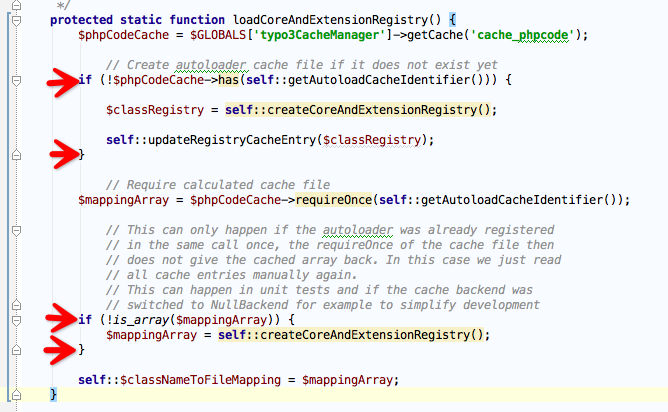
File: t3lib/class.t3lib_autoloader.php->createCoreAndExtensionRegistry
$classRegistry = array_merge($classRegistry, require($extensionAutoloadFile));
Because some of error ext_autoload.php in Extensions. It will attack array_merge.
Solution is:
if(is_array(require($extensionAutoloadFile))){
    $classRegistry = array_merge($classRegistry, require($extensionAutoloadFile));
}
If always error, remark the lines like pic and run, then rollback.
Experience:
1. typo3 4.6, 4.7 auto extension load有bug, array_merge要判断is_array, 否则白屏
2. felogin插件不兼容, Add ts的code不要加trim.
3. md5登录auth修改
4. $this->LOCAL_LANG取语言方法兼容性修改, value为array, source, target
5. 4.7开始数据库强制set names utf8; 为了兼容可把这个强制性去掉. config_default.php里面修改.
6. 4.4->4.7先4.4->4.5然后4.5->4.7
7. Templavoila, DAM需要升级,否则出现异常
8. 如果某些ajax 500 error, 可尝试TS: no_cache=1
9. t3lib_htmlmail发邮件方法在4.7己废弃, 发送失败, newsletter内嵌images功能需要fix.>>己用新方法t3lib_mail_Message解决, demo see below.
10. 有时候install进不去,可能是localconf.php中setMemoryLimit太小了。可删除限制。
Demo:
$mail = t3lib_div::makeInstance('t3lib_mail_Message');
$mail->setFrom(array($sender => $sender_name));
$mail->setReplyTo($reply_to);
$mail->setTo($row['email']);
$mail->setSubject($subject);
$body = 'Any html code!';
preg_match_all("/\![]() embed(Swift_Image::fromPath($src));
if($cid){
$body = str_replace($src, $cid, $body);
}
}
}
$mail->setBody($body, 'text/html', 'utf-8');
$mail->send();
embed(Swift_Image::fromPath($src));
if($cid){
$body = str_replace($src, $cid, $body);
}
}
}
$mail->setBody($body, 'text/html', 'utf-8');
$mail->send();
Typo3 6.2 for windows plugin manager:
ThreadStackSize 8388608
插件执行顺序
|
1. mapping的先后顺序引起多插件配合 session cache未即时生效.
2. Cache的Plugin优先于USER_INT执行 |
Get lastsql
$GLOBALS['TYPO3_DB']->store_lastBuiltQuery = 1;

// process query
$res = $GLOBALS['TYPO3_DB']->exec_SELECTquery($select_fields,$from_table,$where_clause,$groupBy,$orderBy,$limit);

// the complete SQL-Statement
echo $GLOBALS['TYPO3_DB']->debug_lastBuiltQuery;
“blindImageOptions” funktioniert nicht mehr
Seit TYPO3 4.3 funktionierte bei mir die Deaktivierung der Registerkarten Zauberbild und Drag & Drop nicht mehr.
Bisher benutzte ich den folgenden Eintrag:
RTE.default.buttons.image.options.removeItems = magic, dragdrop
bzw.
RTE.default.blindImageOptions = magic, dragdrop
Auffällig war, dass dieser Eintrag nur im RTE nicht mehr zu funktionieren schien, bei den Content-Elementen “Text mit Bild” bzw. “nur Bild” funktionierte das Ausblenden ohne Probleme.
Zwischenzeitlich findet man auch den passenden Bug:
http://bugs.typo3.org/bug_view_advanced_page.php?bug_id=13902
Viel interessanter ist jedoch hier die Problemlösung. Einfach die Einträge mit den korrekten Namen der Tabs versehen:
media_plain, media_magic, media_dragdrop, media_upload
Also zum Beispiel, um bei der oben beschriebenen Anforderung zu bleiben:
RTE.default.buttons.image.options.removeItems = media_magic, media_dragdrop
oder
RTE.default.blindImageOptions = media_magic, media_dragdrop
So einfach kann es manchmal sein …
TYPO3 installtool 白屏
Reason:
你的php.ini的variables_order值为”GPCS”,也就是说系统在定义PHP预定义变量时的顺序是GET,POST,COOKIES,SERVER,没有定义Environment(E),你可以修改php.ini文件的variables_order值为你想要的顺序,如:”EGPCS”。这时,$_ENV的值就可以取得了.
Typo3 solution: ss thumb. Comment line 1616. sysext/install/mod/class.xxxxxxxinstall.php

page title
$GLOBALS['TSFE']->page['title'] = 'your title';
[globalVar = TSFE:id = {$newsSinglePid}]
temp.newsTitle = RECORDS
temp.newsTitle {
source = {GPvar:tx_ttnews|tt_news}
source.insertData = 1
tables = tt_news
conf.tt_news >
conf.tt_news = TEXT
conf.tt_news.field=title
wrap = |
}
page.config.noPageTitle = 2
(Your Object) >
(Your Object) < temp.newsTitle
[global]
eID ts setup
First you make an instance of the tslib_fe class like:
$GLOBALS['TSFE'] = t3lib_div::makeInstance('tslib_fe',
        $GLOBALS['TYPO3_CONF_VARS'],
        t3lib_div::_GP('id'),
        t3lib_div::_GP('type'),
        and more variables if you want
);
(please check your incoming values 😉

Do some other stuff (check if you need this)
$GLOBALS['TSFE']->connectToMySQL();
$GLOBALS['TSFE']->initFEuser();
$GLOBALS['TSFE']->determineId();
$GLOBALS['TSFE']->getCompressedTCarray();
$GLOBALS['TSFE']->initTemplate();
$GLOBALS['TSFE']->getConfigArray();

And you can get the configuration at:
$configuration =
$GLOBALS['TSFE']->tmpl->setup['plugin.']['tx_yourextension_controller.'];
TS doNotLinkIt
lib.myFooterNav = HMENU
lib.myFooterNav.special = directory
lib.myFooterNav.special.value = 44
lib.myFooterNav.wrap = |
lib.myFooterNav.1 = TMENU
lib.myFooterNav.1 {
NO.allWrap = How to use XLF files in TYPO3
Adding a localization to an “Extension Builder” generated TYPO3 extbase extension could be a little tricky as it uses the xlf (XLIFF) format.
This is a simple way to add new localizations without using extra tools like Virtaal or a Pootle server.
1. copy file and prefix filename with language coed: example.xlf to de.example.xlf
2. add target-language=”de” attribute to node file
3. change source nodes to target
Please make sure…
your files are UTF8 encoded
to encapsulate special chars in CDATA
        Dummy text


Default language xlf file (locallang.xlf)
        Das ist ein Test.


German language xlf file (de.locallang.xlf)
Recent Posts
Copyright © 1996-2010 Add Lives. All rights reserved.